
Comparing NVidia GPU suitability for AI
AI requires a lot of power...
In the midst of the modern world’s turmoil here I’m comparing tech specs of different cards suitable for AI tasks (Deep Learning, Object Detection and LLMs). They are all incredibly expensive though.
For more on how GPU choice affects LLM throughput, VRAM limits, and benchmarks across runtimes, see LLM Performance: Benchmarks, Bottlenecks & Optimization. For a broader 2026 buying guide that includes AMD and Intel options, see GPUs for AI in 2026: NVIDIA, AMD, Intel Compared.
This Is AI-generated image. Don’t take it seriously…
Let’s have a look at other options, just to have a look around
| Card | VRAM | Bus Width | Memory Bandwidth | CUDA Cores | Tensor Cores | Power (W) |
|---|---|---|---|---|---|---|
| RTX 4060 Ti 16GB | 16 GB | 128-bit | 288 GB/s | 4,352 | 136 | 165 |
| RTX 4070 Ti 16GB | 16 GB | 256-bit | 672 GB/s | 7,680 | 240 | 285 |
| RTX 4080 16GB | 16 GB | 256-bit | 716.8 GB/s | 9,728 | 304 | 320 |
| RTX 4080 Super 16GB | 16 GB | 256-bit | 736 GB/s | 10,240 | 320 | 320 |
| RTX 4090 24GB | 24 GB | 384-bit | 1008 GB/s | 16,384 | 512 | 450 |
| RTX 5060 Ti 16GB | 16 GB | 128-bit | 448 GB/s | 4,608 | 144 | 180 |
| RTX 5070 Ti 16GB | 16 GB | 256-bit | 896 GB/s | 8,960 | 280 | 300 |
| RTX 5080 16GB | 16 GB | 256-bit | 896 GB/s | 10,752 | 336 | ~320 |
| RTX 5090 32GB | 32 GB | 512-bit | 1792 GB/s | 21,760 | 680 | ~450 |
| RTX 2000 Ada | 16 GB | 128-bit | 224 GB/s | 2,816 | 88 | 70 |
| RTX 4000 Ada | 20 GB | 160-bit | 280 GB/s | 6,144 | 192 | 70 |
| RTX 4500 Ada | 24 GB | 192-bit | 432 GB/s | 7,680 | 240 | 210 |
| RTX 5000 Ada | 32 GB | 256-bit | 576 GB/s | 12,800 | 400 | 250 |
| RTX 6000 Ada | 48 GB | 384-bit | 960 GB/s | 18,176 | 568 | 300 |
Estimated LLM speed by GPU (Qwen 3.6 27B baseline)
The table below estimates generation and prompt throughput from a single measured baseline (RTX 4080 16GB), then scales results using CUDA core count and memory bandwidth. This gives a practical planning reference when comparing NVIDIA cards for local inference.
| GPU | CUDA Cores | Bandwidth | Est. Gen (t/s) | Est. Prompt (t/s) | Est. MTP max 2 Gen | Est. MTP max 2 Prompt |
|---|---|---|---|---|---|---|
| RTX 4080 16GB | 8,192 | 912 GB/s | 45 (measured) | 200 (measured) | 75 (measured) | 151 (measured) |
| RTX 4090 24GB | 12,000 | 1,008 GB/s | ~50 | ~260 | ~82 | ~220 |
| RTX 5060 Ti 16GB | 4,608 | 448 GB/s | ~22 | ~100 | ~38 | ~76 |
| RTX 5070 12GB | 6,144 | 672 GB/s | ~34 | ~140 | ~58 | ~114 |
| RTX 5070 Ti 16GB | 8,960 | 896 GB/s | ~44 | ~190 | ~74 | ~145 |
| RTX 5080 16GB | 10,752 | 960 GB/s | ~45 | ~250 | ~76 | ~195 |
| RTX 5090 32GB | 21,760 | 1,792 GB/s | ~85 | ~390 | ~140 | ~310 |
| RTX PRO 4000 24GB | 6,144 | 672 GB/s | ~34 | ~140 | ~58 | ~114 |
| RTX PRO 4500 32GB | 7,680 | 896 GB/s | ~44 | ~175 | ~74 | ~138 |
| RTX PRO 5000 48GB | 12,800 | 1,344 GB/s | ~60 | ~300 | ~100 | ~240 |
| RTX PRO 6000 96GB | 21,760 | 1,792 GB/s | ~85 | ~390 | ~140 | ~310 |
These numbers are rough estimates, not benchmark results for every card. Actual speed depends on model size, quantisation, context length, and software stack. Performance can drop sharply if a model does not fit fully in VRAM and starts offloading to CPU memory.
For measured cross-platform results, see NVIDIA DGX Spark vs Mac Studio vs RTX-4080. For VRAM-fit model choices, see Best LLM on 16 GB VRAM GPU.
Memory Bandwidth:
- RTX 5090 (1792 GB/s), then RTX 4090(1008 GB/s), then RTX 6000 Ada (960 GB/s)
Tensor Cores:
- RTX 5090 (680), then RTX 6000 Ada (568), then RTX 4090 (512)
CUDA Cores
- RTX 5090 (21,760), then RTX 6000 Ada (18,176, then RTX 4090 (16,384)
RAM
- RTX 6000 Ada (48 GB), then RTX 5090 and RTX 5000 Ada (32 GB), then RTX 4090 (24GB)
Pricing in Australia
- RTX 6000 Ada: 12,000 AUD
- RTX 5090: 6,000 AUD
- RTX 5000 Ada: 7,000 AUD
- RTX 4090: sold out
LLM best counsumer GPU
Still I think RTX 5090 would best choice for machine learning, deep learning, AI and even LLM :)…
Real Prices
A bit pricey…
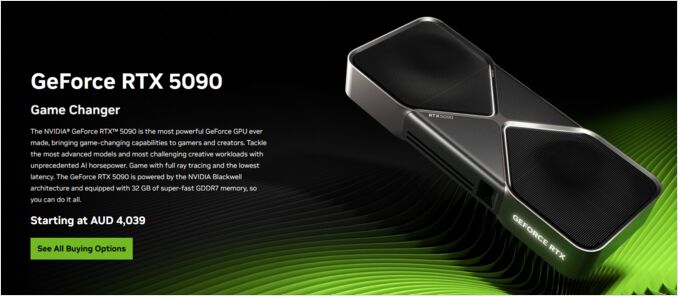
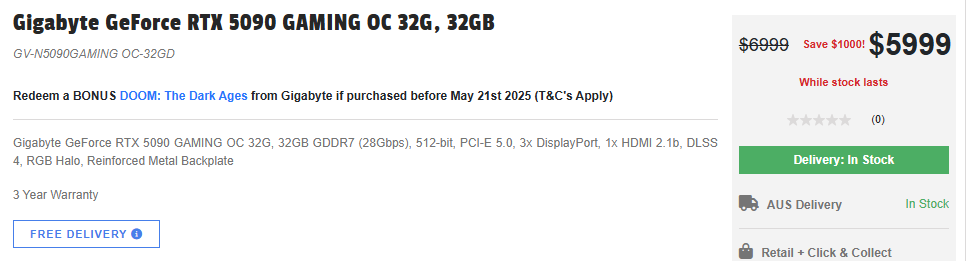
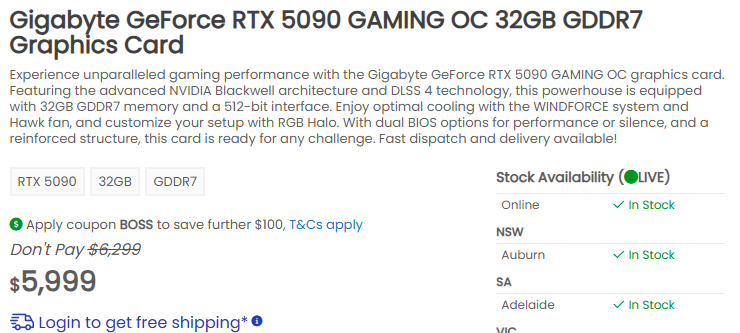
And real RTX 5090 prices are 50% more then expected. Look at this!
That’s on 15/05/2025
To explore LLM benchmarks, VRAM requirements, and performance tuning on different GPUs and runtimes, check our LLM Performance: Benchmarks, Bottlenecks & Optimization hub. For multi-GPU and platform planning, see AI Infrastructure on Consumer Hardware and LLM Performance and PCIe Lanes.
