
Slack Integration Patterns for Alerts and Workflows
Slack is a workflow UI and alert delivery layer.
Slack integrations look deceptively easy because you can post a message in one HTTP call. The interesting part starts when you want Slack to be interactive and reliable.

This deep dive treats Slack as three different integration surfaces:
- Notification sink for one way alerts via incoming webhooks.
- Workflow engine via Workflow Builder and custom workflow steps.
- Event interface via Block Kit buttons, slash commands, and action payloads.
This page describes how systems cross the boundary into a shared UI that can also emit events back into your architecture, not about alert philosophy. For alert strategy and routing, see Modern Alerting Systems Design for Observability Teams.
Related reading:
- Chat Platforms as System Interfaces in Modern Systems
- Discord Integration Pattern for Alerts and Control Loops
- Idempotency in Distributed Systems That Actually Works
- Modern Alerting Systems Design for Observability Teams
Canonical framing and placement in integration patterns
Slack is not just where alerts go to die. Used well, Slack becomes a system interface where messages are stateful artifacts and user interactions are events.
This page is canonically placed under /app-architecture/integration-patterns/slack/ because the main question is not “should we alert” but “what is the contract between our system and Slack”.
If your solution requires any of the following, you are in integration-pattern territory, not simple notification territory:
- A decision loop, where a human approval gates an action.
- A workflow, where Slack collects context and triggers steps.
- An event loop, where Slack emits actions that your system subscribes to.
The Slack platform intentionally supports both one way messaging and bidirectional interaction through request URLs and interaction payloads. Incoming webhooks are a first class way to post JSON payloads, including Block Kit building blocks, to a channel (Sending messages using incoming webhooks). Interactivity is delivered back to your app as HTTP POST requests to a configured Request URL, and those payloads are form encoded with a JSON payload field (Handling user interaction).
Slack as a notification sink
Incoming webhooks are the fastest path to value for alerts and status updates. A webhook is a unique URL tied to an app installation, and you POST a JSON message to it (Sending messages using incoming webhooks).
Opinionated take: webhooks are an excellent default when you want deliver-and-forget messages and you do not need Slack to be a control surface. Webhooks are also an excellent way to decouple your onboarding from your eventual app architecture.
Slack as a workflow engine
Workflow Builder exists because chat is where work actually happens. Workflows can be simple or complex and can connect to apps (Guide to Workflow Builder).
Custom workflow steps let you expose your systems as reusable building blocks inside Workflow Builder (Workflow steps). This is a different integration shape than bots in channels. It moves your integration closer to “tooling inside Slack” than “messages from the outside”.
Opinionated take: if your organization already thinks in workflows and approvals, workflow steps can feel more native than bespoke bots.
Slack as an event interface
Block Kit turns a message into a UI surface (Block Kit). Interactive components like buttons generate action payloads, typically block_actions payloads, that are sent to your app when a user clicks (block_actions payload).
Buttons have explicit identifiers action_id and optional value, and must be hosted inside section or actions blocks (Button element). When you design a message with a button, you are designing an event source.
This is where FAQ topics like request verification, required scopes, and safe internal triggers become the center of the design.
Architecture patterns that scale
Webhook flow for one way alerting
[service] -> [alert formatter] -> [slack incoming webhook] -> [channel]
Incoming webhooks accept JSON payloads and support Block Kit layouts (Sending messages using incoming webhooks).
When the FAQ asks about the fastest way to send alerts, this is usually it.
Brokered flow with a queue for reliability and backpressure
[services] -> [queue topic] -> [slack dispatcher] -> [slack api]
                     |                 |
                     |                 +-> [rate limit handler]
                     +-> [dead letter queue]
Slack rate limits apply to HTTP based APIs, including incoming webhooks, and Slack returns HTTP 429 with a Retry-After header when you exceed limits (Rate limits).
Opinionated take: if you post alerts directly from every service, the first incident turns into a distributed denial of service against your own Slack integration. A dispatcher behind a queue tends to be a calmer architecture.
Workflow automation pattern with approvals
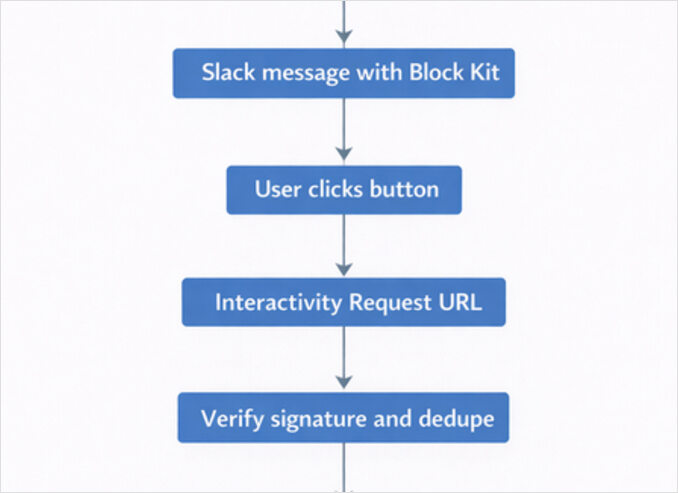
[alert] -> [slack message with button] -> [button click]
   -> [action payload] -> [approval handler] -> [internal API] -> [update message]
Slack interactivity requires configuring a Request URL and enabling Interactivity. Slack sends interaction payloads as application/x-www-form-urlencoded with a payload parameter that contains JSON, and you must respond with HTTP 200 within 3 seconds (Handling user interaction).
This is the pattern behind the FAQ item about triggering internal actions safely.
Slack interaction flowchart diagram
Webhook vs app and the implementation mechanics
Recommended libraries
Go:
- slack-go/slack for Web API and Block Kit structures (slack-go/slack repo, pkg.go.dev docs)
Python:
- slack_sdk (Python Slack SDK) for Web API clients, signature helpers, and retry infrastructure (Python Slack SDK docs, python-slack-sdk repo)
Webhook vs app bot approach
A practical comparison:
| Capability | Incoming webhook | Slack app with bot token |
|---|---|---|
| Post messages | Yes | Yes |
| Post Block Kit layouts | Yes | Yes |
| Receive button clicks | Only if tied to an app with interactivity | Yes |
| Slash commands | No | Yes |
| Workflow steps | No | Yes |
| Security surface | Webhook URL secrecy | OAuth tokens plus signing secret |
| Best fit | One way alerts | Workflows, approvals, interactive UI |
Slack explicitly supports Block Kit layouts with incoming webhooks (Sending messages using incoming webhooks). Interactivity is configured per app and delivered to a Request URL (Handling user interaction).
Opinionated take: webhooks are a great first milestone, but as soon as you want Slack to be a control surface, you are building an app. Avoid pretending otherwise.
Scopes and permissions
Slack scopes define what your app can do. There is a central scopes reference and individual scope pages (Scopes reference). For sending messages via Web API, chat:write is the canonical scope (chat:write scope).
For slash commands, you typically need the commands scope and a configured command request URL (commands are part of interactivity docs, and each command has its own Request URL) (Handling user interaction).
FAQ note: button payload delivery is not “a scope”, it is an app setting. Your app receives payloads when Interactivity is enabled and Request URL is set, but posting message updates still generally requires chat:write.
Rate limits and retries
Slack rate limits return HTTP 429 and include Retry-After in seconds, and this applies to HTTP based APIs including incoming webhooks (Rate limits).
In practice:
- honor Retry-After
- apply backoff with jitter for transient 5xx
- centralize Slack delivery in a dispatcher when volume grows
Idempotency and deduplication
Slack expects an acknowledgment for interaction payloads within 3 seconds, otherwise users see an error and Slack may retry delivery behavior depending on feature (Handling user interaction). For the Events API, Slack explicitly provides retry metadata headers x-slack-retry-num (Events API).
Even without explicit retries, duplicates happen because users double-click and because distributed systems retransmit. If your button triggers an internal action, treat clicks as at least once events and dedupe.
A practical idempotency strategy for approvals:
- idempotency key = team_id + channel_id + message_ts + action_id + user_id
- store key in Redis with TTL matching your workflow window
- internal action API also enforces idempotency, not only the Slack handler
Security fundamentals and request verification
Slack signs requests to your server using your app signing secret. Slack sends X-Slack-Signature and X-Slack-Request-Timestamp headers, and Slack recommends rejecting requests older than five minutes to prevent replay attacks (Verifying requests from Slack).
Two footguns that show up in real code reviews:
- You must compute the signature over the raw request body, before JSON parsing or form decoding (Verifying requests from Slack).
- You must ack interactive payloads within 3 seconds, so do heavy work asynchronously and use response_url to communicate results (Handling user interaction).
The Python Slack SDK includes a request signature verifier utility in code and docs (python-slack-sdk signature verifier).
Message and interaction design
Alert message template
If you want Slack to act like a system interface, structure your messages so decisions are obvious. A message template that works well across teams:
- title
- severity
- context
- action hint
- links
A minimal template:
title: checkout error rate elevated severity: warn context: service=checkout env=prod region=us-east action_hint: click Approve restart to trigger a safe restart
Incoming webhook payload example
Incoming webhooks accept JSON payloads and can include rich layouts using Block Kit (Sending messages using incoming webhooks).
{
  "text": "checkout error rate elevated",
  "blocks": [
    {
      "type": "header",
      "text": { "type": "plain_text", "text": "checkout error rate elevated" }
    },
    {
      "type": "section",
      "fields": [
        { "type": "mrkdwn", "text": "*severity*\\nwarn" },
        { "type": "mrkdwn", "text": "*context*\\nservice=checkout env=prod region=us-east" }
      ]
    },
    {
      "type": "section",
      "text": { "type": "mrkdwn", "text": "*action_hint*\\nClick Approve to trigger a safe restart." }
    }
  ]
}
Designing buttons and identifiers
Buttons must be inside section or actions blocks and include action_id and optional value (Button element). action_id is your routing key. value is your payload. Together, they are your event schema.
Opinionated take: choose action_id values like stable API endpoints. Names like “approve_restart” age better than “button_1”.
Interaction payload handling, response_url, and timing
Slack sends interaction payloads to your Request URL as form encoded data with a payload parameter containing JSON. The payload includes a type field defining the source, such as block_actions for button clicks (Handling user interaction, Interaction payloads).
You must return HTTP 200 within 3 seconds for the acknowledgment response (Handling user interaction). Use response_url to update the original message or respond in-channel or in a thread, and Slack limits response_url usage to up to five times within thirty minutes (Handling user interaction).
This timing constraint is a design constraint. It forces you to decouple “acknowledge” from “do work”.
Interaction patterns that fit Slack
- Buttons in Block Kit for approvals and branching.
- Slash commands for explicit user intent and parameters.
- Workflow steps for repeatable business processes in Workflow Builder (Workflow steps).
- Shortcuts and modals when you need structured input, with trigger_id constraints described in interactivity docs (Handling user interaction).
Go and Python examples
Publisher note: these can be split into dedicated example pages:
/app-architecture/integration-patterns/slack/go-example/app-architecture/integration-patterns/slack/python-example
The examples prioritize one thing that keeps systems stable:
- verify Slack signatures
- ack within three seconds
- dedupe actions
- trigger an internal HTTP POST
- optionally update Slack using response_url
Go example send alert and handle button approval
Prereqs:
- Slack app with Interactivity enabled and Request URL configured (Handling user interaction).
- Bot token with chat:write scope (chat:write scope).
- A signing secret for request verification (Verifying requests from Slack).
package main

import (
  "bytes"
  "crypto/hmac"
  "crypto/sha256"
  "encoding/hex"
  "encoding/json"
  "io"
  "log"
  "net/http"
  "net/url"
  "os"
  "strconv"
  "strings"
  "sync"
  "time"

  "github.com/slack-go/slack"
)

type BlockActionPayload struct {
  Type  string `json:"type"`
  Team  struct{ ID string `json:"id"` } `json:"team"`
  User  struct{ ID string `json:"id"` } `json:"user"`
  Channel struct {
    ID string `json:"id"`
  } `json:"channel"`
  Message struct {
    Ts string `json:"ts"`
  } `json:"message"`
  ResponseURL string `json:"response_url"`
  Actions []struct {
    ActionID string `json:"action_id"`
    Value    string `json:"value"`
    Type     string `json:"type"`
  } `json:"actions"`
}

type InternalAction struct {
  Action     string `json:"action"`
  TeamID     string `json:"team_id"`
  ChannelID  string `json:"channel_id"`
  MessageTS  string `json:"message_ts"`
  UserID     string `json:"user_id"`
  Value      string `json:"value"`
}

var (
  // In production, store this in Redis with TTL
  seenMu sync.Mutex
  seen   = map[string]time.Time{}
  ttl    = 10 * time.Minute
)

func main() {
  botToken := os.Getenv("SLACK_BOT_TOKEN")
  signingSecret := os.Getenv("SLACK_SIGNING_SECRET")
  channelID := os.Getenv("SLACK_CHANNEL_ID")
  internalURL := os.Getenv("INTERNAL_API_URL")
  listenAddr := os.Getenv("LISTEN_ADDR") // e.g. :8080

  if botToken == "" || signingSecret == "" || channelID == "" || internalURL == "" || listenAddr == "" {
    log.Fatal("missing env vars SLACK_BOT_TOKEN SLACK_SIGNING_SECRET SLACK_CHANNEL_ID INTERNAL_API_URL LISTEN_ADDR")
  }

  api := slack.New(botToken)

  // Send an alert message with an approval button.
  // Buttons are interactive Block Kit elements with action_id and value.
  // See Slack Block Kit button element docs.
  blocks := slack.Blocks{
    BlockSet: []slack.Block{
      slack.NewHeaderBlock(slack.NewTextBlockObject("plain_text", "checkout error rate elevated", false, false)),
      slack.NewSectionBlock(
        slack.NewTextBlockObject("mrkdwn", "*severity*\\nwarn\\n*context*\\nservice=checkout env=prod", false, false),
        nil,
        nil,
      ),
      slack.NewActionBlock(
        "actions_1",
        slack.NewButtonBlockElement("approve_restart", "restart", slack.NewTextBlockObject("plain_text", "Approve restart", false, false)),
      ),
    },
  }

  _, ts, err := api.PostMessage(channelID, slack.MsgOptionBlocks(blocks.BlockSet...))
  if err != nil {
    log.Fatalf("PostMessage failed: %v", err)
  }
  log.Printf("posted alert message_ts=%s", ts)

  // Interactivity endpoint
  http.HandleFunc("/slack/actions", func(w http.ResponseWriter, r *http.Request) {
    rawBody, err := io.ReadAll(r.Body)
    if err != nil {
      http.Error(w, "read body failed", http.StatusBadRequest)
      return
    }
    r.Body.Close()

    // Verify Slack request signature on the raw body and timestamp.
    // See Slack verifying requests docs.
    if !verifySlackRequest(r.Header, rawBody, signingSecret) {
      http.Error(w, "invalid signature", http.StatusUnauthorized)
      return
    }

    // Slack sends application/x-www-form-urlencoded with payload=JSON
    vals, err := url.ParseQuery(string(rawBody))
    if err != nil {
      http.Error(w, "bad form body", http.StatusBadRequest)
      return
    }
    payloadStr := vals.Get("payload")
    if payloadStr == "" {
      http.Error(w, "missing payload", http.StatusBadRequest)
      return
    }

    var p BlockActionPayload
    if err := json.Unmarshal([]byte(payloadStr), &p); err != nil {
      http.Error(w, "bad payload json", http.StatusBadRequest)
      return
    }

    // Ack within 3 seconds. Do real work async and use response_url for updates.
    // See Slack interactivity docs on acknowledgment timing.
    w.WriteHeader(http.StatusOK)
    _, _ = w.Write([]byte(""))

    go func() {
      if p.Type != "block_actions" || len(p.Actions) == 0 {
        return
      }
      a := p.Actions[0]
      if a.ActionID != "approve_restart" {
        return
      }

      // Dedupe approvals
      key := strings.Join([]string{p.Team.ID, p.Channel.ID, p.Message.Ts, p.User.ID, a.ActionID, a.Value}, "|")
      if !tryOnce(key) {
        return
      }

      req := InternalAction{
        Action:    "approve_restart",
        TeamID:    p.Team.ID,
        ChannelID: p.Channel.ID,
        MessageTS: p.Message.Ts,
        UserID:    p.User.ID,
        Value:     a.Value,
      }

      if err := postJSON(internalURL, req); err != nil {
        log.Printf("internal action failed: %v", err)
        _ = replyViaResponseURL(p.ResponseURL, "action failed, check logs")
        return
      }

      _ = replyViaResponseURL(p.ResponseURL, "approval received, internal action triggered")
    }()
  })

  log.Printf("listening on %s", listenAddr)
  log.Fatal(http.ListenAndServe(listenAddr, nil))
}

func tryOnce(key string) bool {
  now := time.Now()

  seenMu.Lock()
  defer seenMu.Unlock()

  for k, t := range seen {
    if now.Sub(t) > ttl {
      delete(seen, k)
    }
  }
  if _, ok := seen[key]; ok {
    return false
  }
  seen[key] = now
  return true
}

func verifySlackRequest(h http.Header, body []byte, signingSecret string) bool {
  ts := h.Get("X-Slack-Request-Timestamp")
  sig := h.Get("X-Slack-Signature")
  if ts == "" || sig == "" {
    return false
  }

  tsInt, err := strconv.ParseInt(ts, 10, 64)
  if err != nil {
    return false
  }

  // Reject requests older than 5 minutes to reduce replay risk.
  if time.Since(time.Unix(tsInt, 0)) > 5*time.Minute {
    return false
  }

  base := "v0:" + ts + ":" + string(body)
  mac := hmac.New(sha256.New, []byte(signingSecret))
  mac.Write([]byte(base))
  sum := hex.EncodeToString(mac.Sum(nil))
  expected := "v0=" + sum

  return hmac.Equal([]byte(expected), []byte(sig))
}

func postJSON(url string, body any) error {
  b, err := json.Marshal(body)
  if err != nil {
    return err
  }
  req, err := http.NewRequest(http.MethodPost, url, bytes.NewReader(b))
  if err != nil {
    return err
  }
  req.Header.Set("Content-Type", "application/json")
  c := &http.Client{Timeout: 5 * time.Second}
  res, err := c.Do(req)
  if err != nil {
    return err
  }
  defer res.Body.Close()
  if res.StatusCode < 200 || res.StatusCode >= 300 {
    return io.ErrUnexpectedEOF
  }
  return nil
}

func replyViaResponseURL(responseURL string, text string) error {
  if responseURL == "" {
    return nil
  }
  // response_url accepts JSON payloads and can post ephemeral by default.
  b, _ := json.Marshal(map[string]string{
    "text": text,
  })
  req, _ := http.NewRequest(http.MethodPost, responseURL, bytes.NewReader(b))
  req.Header.Set("Content-Type", "application/json")
  c := &http.Client{Timeout: 5 * time.Second}
  res, err := c.Do(req)
  if err != nil {
    return err
  }
  defer res.Body.Close()
  return nil
}
Python example send alert and handle button approval
Prereqs:
- Slack app with Interactivity enabled and Request URL configured (Handling user interaction).
- Bot token with chat:write scope (chat:write scope).
- Signing secret for request verification (Verifying requests from Slack).
import os
import json
import time
import threading
import requests
from flask import Flask, request, make_response
from slack_sdk import WebClient
from slack_sdk.signature import SignatureVerifier

SLACK_BOT_TOKEN = os.environ["SLACK_BOT_TOKEN"]
SLACK_SIGNING_SECRET = os.environ["SLACK_SIGNING_SECRET"]
SLACK_CHANNEL_ID = os.environ["SLACK_CHANNEL_ID"]
INTERNAL_API_URL = os.environ["INTERNAL_API_URL"]

client = WebClient(token=SLACK_BOT_TOKEN)
verifier = SignatureVerifier(signing_secret=SLACK_SIGNING_SECRET)

app = Flask(__name__)

# In production, store these in Redis
_seen = {}
_TTL_SECONDS = 600

def try_once(key: str) -> bool:
    now = int(time.time())
    expired = [k for k, t in _seen.items() if now - t > _TTL_SECONDS]
    for k in expired:
        _seen.pop(k, None)
    if key in _seen:
        return False
    _seen[key] = now
    return True

def post_internal_action(payload: dict) -> None:
    requests.post(INTERNAL_API_URL, json=payload, timeout=5)

def reply_via_response_url(response_url: str, text: str) -> None:
    if not response_url:
        return
    requests.post(response_url, json={"text": text}, timeout=5)

def send_alert_with_button() -> None:
    blocks = [
        {"type": "header", "text": {"type": "plain_text", "text": "checkout error rate elevated"}},
        {"type": "section", "text": {"type": "mrkdwn", "text": "*severity*\\nwarn\\n*context*\\nservice=checkout env=prod"}},
        {
            "type": "actions",
            "block_id": "actions_1",
            "elements": [
                {
                    "type": "button",
                    "text": {"type": "plain_text", "text": "Approve restart"},
                    "action_id": "approve_restart",
                    "value": "restart"
                }
            ]
        }
    ]
    # chat.postMessage requires chat:write scope.
    client.chat_postMessage(channel=SLACK_CHANNEL_ID, text="checkout error rate elevated", blocks=blocks)

@app.post("/slack/actions")
def slack_actions():
    raw_body = request.get_data()  # Slack recommends verifying raw body before parsing
    if not verifier.is_valid_request(raw_body, request.headers):
        return make_response("invalid signature", 401)

    # Slack sends application/x-www-form-urlencoded with a payload field containing JSON.
    payload_str = request.form.get("payload", "")
    if not payload_str:
        return make_response("missing payload", 400)
    payload = json.loads(payload_str)

    # Ack within 3 seconds. Slack user sees errors if you do not.
    # See Slack interactivity docs on acknowledgment.
    resp = make_response("", 200)

    def work():
        if payload.get("type") != "block_actions":
            return
        actions = payload.get("actions", [])
        if not actions:
            return

        a = actions[0]
        if a.get("action_id") != "approve_restart":
            return

        team_id = payload.get("team", {}).get("id", "")
        channel_id = payload.get("channel", {}).get("id", "")
        user_id = payload.get("user", {}).get("id", "")
        message_ts = payload.get("message", {}).get("ts", "")
        value = a.get("value", "")

        key = "|".join([team_id, channel_id, message_ts, user_id, "approve_restart", value])
        if not try_once(key):
            return

        internal_payload = {
            "action": "approve_restart",
            "team_id": team_id,
            "channel_id": channel_id,
            "message_ts": message_ts,
            "user_id": user_id,
            "value": value,
        }

        try:
            post_internal_action(internal_payload)
            reply_via_response_url(payload.get("response_url", ""), "approval received, internal action triggered")
        except Exception:
            reply_via_response_url(payload.get("response_url", ""), "action failed, check logs")

    threading.Thread(target=work, daemon=True).start()
    return resp

if __name__ == "__main__":
    send_alert_with_button()
    app.run(host="0.0.0.0", port=int(os.getenv("PORT", "8080")))
Ops notes: routing, UX, security, links, and SEO
When to use Slack vs paging tools vs Discord
This page is about mechanics. Routing is strategy. Still, the boundary is easy to describe.
| Channel | Best for | Failure mode |
|---|---|---|
| PagerDuty or equivalent | Urgent user impact requiring immediate response | People sleep through Slack |
| Slack | Coordination, approvals, workflow execution | Noise and channel fatigue |
| Discord | Teams that live in Discord, lighter weight control loops | Less enterprise workflow structure |
Use Slack when you want the conversation and the workflow to be the interface. Use paging tools when the alert is not optional. If you are balancing Slack interaction design against service boundaries and persistence choices, this app architecture overview helps place that decision in the larger system. For a deeper routing model, see Modern Alerting Systems Design for Observability Teams. For a Discord integration alternative, see Discord Integration Pattern for Alerts and Control Loops.
Accessibility and UX notes
- Put high volume alerts into their own channel, and keep human discussion in threads.
- Use threads for per-incident context and updates. response_url can post in-channel and in threads when thread_ts is provided (Handling user interaction).
- Use ephemeral responses when acknowledging user actions to avoid channel spam, but remember ephemeral delivery is not guaranteed and is session dependent (chat.postEphemeral).
- Use Block Kit Builder to prototype layouts quickly (Block Kit).
- If you add images, include meaningful alt text where supported and keep a plain text fallback in the top level text field.
Security checklist
- Verify every incoming Slack request using signing secret headers and raw body (Verifying requests from Slack).
- Reject requests with timestamps older than five minutes to reduce replay risk (Verifying requests from Slack).
- Keep tokens and webhook URLs in a secret manager, never in git.
- Use least privilege OAuth scopes and rotate secrets when people change roles (Scopes reference).
- Authenticate and authorize the internal action API separately, do not treat Slack as an auth boundary.
- Make approvals idempotent and deduplicated.
- Log approvals in an audit friendly way, including team, channel, message timestamp, user, and action.
Conclusion
Slack is at its best when you treat it as a systems boundary, not a message sink. Incoming webhooks cover fast alert delivery. Apps plus interactivity turn Slack into a workflow engine and event interface. The hard parts are signature verification, timing constraints, deduplication, and choosing where Slack fits in your alert routing model.
Next links:
