
Kanban in Hermes Agent for Self Hosted LLM Workflows
Control Hermes Kanban load on your self hosted LLM.
Hermes Agent ships with a Kanban-style board and the Hermes Gateway that can saturate your self-hosted LLM if too many tasks are dispatched at once.
I can say you can easily ddos your own LLM this way.
Hermes Kanban is a durable multi-profile board backed by ~/.hermes/kanban.db.
Each lane represents a phase of work, and each card is a task that can be claimed by a specific Hermes profile.
Out of the box, the dispatcher can promote many ready tasks in one pass. That is fine for elastic cloud APIs, but it can overload a small self-hosted GPU cluster.
If you are new to this stack, start with the broader Hermes setup and operations guide and the AI Systems pillar for surrounding architecture.
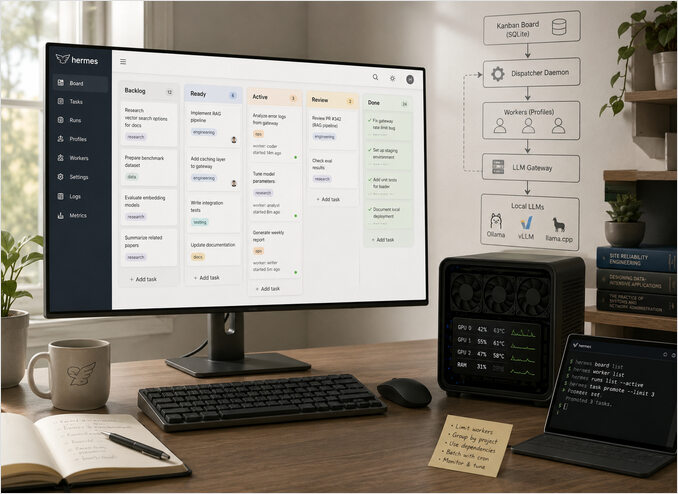
This post shows how to:
- Understand how Hermes Kanban dispatch interacts with your LLM gateway.
- Control parallelism safely for heavy tasks.
- Batch promotions with cron so background jobs do not collide with interactive use.
- Monitor and tune the system so GPUs stay busy without overload.
How Hermes Kanban and the dispatcher work
At a high level, the system has three layers:
- Board - durable SQLite state for tasks, columns, relations, and history.
- Workers - Hermes profiles started in isolated workspaces to process a task.
- Dispatcher - a long-lived process that scans for dispatchable cards and starts runs.
Tasks created from the CLI or the dashboard usually start in backlog or ready. The hermes kanban subcommands used below are summarised in the Hermes Agent CLI cheat sheet.
The dispatcher scans for eligible cards, claims one atomically, and starts the assigned profile with its tools and memory.
Each worker then calls your LLM gateway or local runtime (for example, OpenAI-compatible endpoints backed by Ollama, vLLM, or llama.cpp). For deployment choices across these runtimes, use the LLM Hosting in 2026 Local Self-Hosted and Cloud Infrastructure Compared. If you are tuning request fan-out on Ollama itself, this pairs well with How Ollama Handles Parallel Requests.
If you add many heavy tasks and do not cap promotions, your gateway can get flooded with concurrent requests.
On a single-GPU or CPU-bound host, that often means queueing, thrashing, and timeouts instead of better throughput.
The practical limitation today
In current Hermes builds many teams run, dispatcher config exposes only two Kanban dispatch keys and does not apply a global active-task cap from config:
kanban:
  dispatch_in_gateway: false
  dispatch_interval_seconds: 10
For active-task control, rely on explicit dispatch cadence (hermes kanban dispatch --max ...) plus dependency modeling.
Known gotchas:
- Do not run gateway-embedded dispatch and
hermes kanban daemon --forceagainst the same board, or you can get claim races. - If the gateway is down,
readytasks do not dispatch and can burst later when service returns. - Longer dispatch intervals feel uneven because claiming happens in ticks.
- Behavior can vary across versions because run-state and reclaim edge cases were patched over time.
Quick verification when behavior looks wrong:
# 1) confirm exactly one dispatcher path is active
pgrep -af "hermes gateway start|hermes kanban daemon"

# 2) check the wired Kanban dispatcher keys
rg "dispatch_in_gateway|dispatch_interval_seconds" ~/.hermes/config.yaml

# 3) inspect queue shape
hermes kanban list --status ready
hermes kanban list --status running
Key ideas:
- Dispatcher config wires
dispatch_in_gatewayanddispatch_interval_seconds. dispatch --maxlimits new spawns in that pass, not total running tasks.- For small self-hosted clusters, start conservative and increase only after latency stays stable.
When first deploying Hermes near your LLM gateway:
- Keep only supported Kanban dispatcher keys in config.
- Observe GPU and CPU utilization under real queue pressure.
- Use Strategy 1 or Strategy 2 for deterministic pacing.
Investigation findings and root cause
hermes kanban dispatch does not read config.yaml for max_active_tasks.
In hermes_cli/kanban.py, the dispatch command exposes --max as a CLI cap (default None) and passes only args.max into kb.dispatch_once(...). There is no max_active_tasks config lookup in this path. See hermes_cli/kanban.py raw.
Then in kanban_db.dispatch_once, the only cap is max_spawn, with logic equivalent to:
if max_spawn is not None and spawned >= max_spawn:
    break
There is no check of already running tasks and no max_active_tasks reference in that dispatch path. See hermes_cli/kanban_db.py raw.
Effective behavior:
hermes kanban dispatch
unbounded for that pass (limited by ready queue size).
hermes kanban dispatch --max 2
caps only new spawns in that pass, not total running tasks.
The wired config knobs around gateway dispatch are kanban.dispatch_in_gateway and kanban.dispatch_interval_seconds.
So max_active_tasks is ignored in this dispatch path because it is not implemented there.
Strategy 1 - Encode dependencies for strictly sequential flows
Some workflows should run strictly one after another — for example:
- multi step data pipelines with shared intermediate artefacts
- migrations or infrastructure changes
- batch jobs that write to the same object store or database
Hermes Kanban supports parent child dependencies between tasks so that a child card becomes dispatchable only when its parent is done.
You can model this with a small helper script around the Hermes CLI:
#!/usr/bin/env bash

set -euo pipefail

parent_id="$(hermes kanban add \
  --title 'Ingest customer logs for April' \
  --profile 'etl-worker' \
  --column backlog)"

hermes kanban add \
  --title 'Generate April anomaly report' \
  --profile 'analytics-worker' \
  --column backlog \
  --parent "${parent_id}"

hermes kanban add \
  --title 'Publish April summary to dashboard' \
  --profile 'reporting-worker' \
  --column backlog \
  --parent "${parent_id}"
With an appropriate board policy and low dispatcher limits only the parent task runs first.
Once it finishes the child tasks gradually become ready, and the dispatcher pulls them one by one without ever exceeding your concurrency caps.
Strategy 2 - Use Linux cron with a running-aware dispatch cap
If you want deterministic pacing, use host cron plus a small wrapper script.
Instead of always calling dispatch --max 2, first count currently running tasks, then dispatch only the remaining slots.
Create hermes-kanban-dispatch-capped.sh:
#!/usr/bin/env bash
set -euo pipefail

MAX_PARALLEL="${MAX_PARALLEL:-2}"
BOARD="${BOARD:-}"

board_args=()
if [[ -n "$BOARD" ]]; then
  board_args=(--board "$BOARD")
fi

# or where your hermes is installed
export PATH="/home/abc/.local/bin:$PATH"

running_out="$(hermes kanban "${board_args[@]}" list --status running)"

if [[ "$running_out" == *"(no matching tasks)"* ]]; then
  running_count=0
else
  running_count="$(printf '%s\n' "$running_out" | wc -l)"
fi

slots=$(( MAX_PARALLEL - running_count ))

if (( slots <= 0 )); then
  echo "Already at limit running=$running_count max=$MAX_PARALLEL dispatch skipped"
  exit 0
fi

echo "running=$running_count max=$MAX_PARALLEL slots=$slots dispatching up to $slots"

hermes kanban "${board_args[@]}" dispatch --max "$slots"
Make it executable:
chmod +x ./hermes-kanban-dispatch-capped.sh
Run it with:
MAX_PARALLEL=2 ./hermes-kanban-dispatch-capped.sh
For a specific board:
BOARD=my-board MAX_PARALLEL=2 ./hermes-kanban-dispatch-capped.sh
Schedule it once per minute with cron:
* * * * * /opt/hermes/scripts/hermes-kanban-dispatch-capped.sh >> /var/log/hermes/kanban-cron.log 2>&1
Operational notes:
- Cron often has a minimal
PATH, so ifhermesis not found, use its full path inside the script (for example/usr/local/bin/hermes). - If you log to
/var/log/hermes/..., create that directory first and ensure the cron user has write access.
Example:
sudo mkdir -p /var/log/hermes
sudo chown "$USER":"$USER" /var/log/hermes
Create or edit cron entries with:
crontab -e
Then verify with:
crontab -l
Sub-minute cadence with one cron entry
Cron ticks once per minute, but you can still dispatch more frequently by running a short loop inside the script.
Example hermes-kanban-dispatch-subminute.sh:
#!/usr/bin/env bash
set -euo pipefail

LOCK_FILE="/tmp/hermes-kanban-dispatch.lock"
RUNS_PER_MINUTE="${RUNS_PER_MINUTE:-4}"    # 4 runs => every 15 seconds
CAP_SCRIPT="${CAP_SCRIPT:-/opt/hermes/scripts/hermes-kanban-dispatch-capped.sh}"

exec 9>"$LOCK_FILE"
flock -n 9 || exit 0

sleep_seconds=$(( 60 / RUNS_PER_MINUTE ))

for ((i=1; i<=RUNS_PER_MINUTE; i++)); do
  "$CAP_SCRIPT"

  if (( i < RUNS_PER_MINUTE )); then
    sleep "$sleep_seconds"
  fi
done
Make it executable:
chmod +x ./hermes-kanban-dispatch-subminute.sh
Schedule it once per minute:
* * * * * /opt/hermes/scripts/hermes-kanban-dispatch-subminute.sh >> /var/log/hermes/kanban-subminute.log 2>&1
This gives an effective sub-minute cadence while flock prevents overlapping runs.
Why this works:
list --status runninggives current running load.dispatch --max Ncaps only new spawns for that pass.- Computing
Nas remaining slots keeps total running tasks near your target limit.
Important caveat: this cap works only for dispatches made through this script.
Disable gateway embedded dispatch, otherwise it can still promote tasks independently:
kanban:
  dispatch_in_gateway: false
The official docs describe both command capabilities and note gateway dispatch defaults in the Kanban feature guide: Hermes Kanban docs.
Internal Hermes Cron
Do not use it.
Do you really want your llm to process regular prompts like Execute in terminal the command /path/hermes-kanban-dispatch-capped.sh, especially when it’s busy doing some useful work?
Hermes Kanban Monitoring and Tuning
Whichever strategy you choose you should monitor:
- LLM gateway metrics — request rate, latency, error rate, token throughput.
- Node health — GPU utilisation, VRAM usage, CPU load and RAM.
- Hermes metrics — how many tasks are in backlog, ready, active and done.
For production metric baselines and dashboards, see Monitor LLM Inference in Production with Prometheus and Grafana and the broader LLM Performance hub.
Start with low concurrency, then gradually raise limits while watching for:
- rising latency at constant throughput
- increasing timeout or rate limit errors
- long tails where some tasks stay active for a very long time
As soon as you see these symptoms roll back to the previous stable configuration and keep that as your default.
When Kanban is the right tool
Hermes Kanban shines when you have:
- long lived research or engineering backlogs
- multi agent collaboration with named profiles
- workflows that must survive restarts and host reboots
- humans who want a dashboard to triage work
If you only need a single run to create a few temporary helpers, the built in delegate task tools are usually simpler.
Once you need history, dashboards and strict control over how your agents hit self hosted LLMs the Kanban board plus dispatcher is the right foundation.
With a few configuration tweaks and optional cron based batching you can keep Hermes Kanban responsive while protecting your gateway and hardware.
For a broader look at how Hermes-style background workers fit into production AI assistant architectures — including schedulers, queue-based polling, claim protocols, durable workflows, and semantic evaluation — see Polling Agents in AI Assistants: 11 Implementation Patterns. When multiple named profiles or specialist agents need to coordinate beyond simple task dispatch, Multi-Agent Orchestration Patterns covers the coordination topologies — hub-and-spoke, fan-out, swarm — that underpin larger multi-agent setups on self-hosted infrastructure.
