Documentation Tools in 2026: Markdown, LaTeX, PDF & Printing Workflows
A practical hub for document creation, formatting, conversion, and printing workflows using Markdown, LaTeX, PDF tools, and automation.
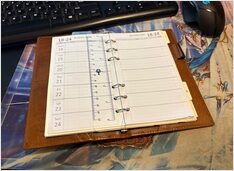
Quicknotes on printing custom planner inserts at home
Creating custom planner inserts combines the satisfaction of analog planning with the flexibility of digital design tools. Here are just the notes on printing them. This guide is part of our Documentation Tools in 2026: Markdown, LaTeX, PDF & Printing Workflows hub.
Master PDF text extraction with Python
PDFMiner.six is a powerful Python library for extracting text, metadata, and layout information from PDF documents. This guide is part of our Documentation Tools in 2026: Markdown, LaTeX, PDF & Printing Workflows hub.
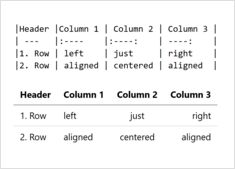
Complete guide to creating tables in Markdown
Tables are one of the most powerful features in Markdown for organizing and presenting structured data. Whether you’re creating technical documentation, README files, or blog posts, understanding how to properly format tables can significantly improve your content’s readability and professionalism. This guide is part of our Documentation Tools in 2026: Markdown, LaTeX, PDF & Printing Workflows hub.
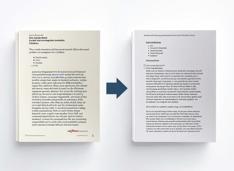
Transform LaTeX documents to Markdown efficiently
Converting LaTeX documents to Markdown has become essential for modern publishing workflows, integrating static site generators, documentation platforms, and version control systems while maintaining readability and simplicity. This guide is part of our Documentation Tools in 2026: Markdown, LaTeX, PDF & Printing Workflows hub.
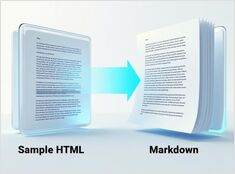
Python for converting HTML to clean, LLM-ready Markdown
Converting HTML to Markdown is a fundamental task in modern development workflows, particularly when preparing web content for Large Language Models (LLMs), documentation systems, or static site generators like Hugo. This guide is part of our Documentation Tools in 2026: Markdown, LaTeX, PDF & Printing Workflows hub.

Using pandoc, python, or online tools for convertion to MD
Converting Word documents to Markdown format is a very common task for technical writers, developers, and content creators who want to move their content to platforms with Markdown (like GitHub, GitLab, static site generators like Hugo). This guide is part of our Documentation Tools in 2026: Markdown, LaTeX, PDF & Printing Workflows hub.
MiKTeX vs TeX Live vs TinyTeX
If you write technical docs, papers, or books on Windows, you’ll almost certainly choose one of three LaTeX distributions for Windows 11. This guide is part of our Documentation Tools in 2026: Markdown, LaTeX, PDF & Printing Workflows hub.
Markdown CodeBlocks are simple
Here I’m reviewing Codeblock options in Markdown—how to specify the programming language, diff formatting and code block filename. This guide is part of our Documentation Tools in 2026: Markdown, LaTeX, PDF & Printing Workflows hub.
My favorite lib is pdf-reports
Generating PDF Reports Using Python
Python, with its extensive libraries and modules, offers powerful tools for generating professional PDF reports. This guide explores various methods to create PDF documents using Python, covering popular libraries like ReportLab, FPDF, Xhtml2pdf, WeasyPrint, Jinja2, pdf-reports and PdfKit. It is part of our Documentation Tools in 2026: Markdown, LaTeX, PDF & Printing Workflows hub.
LLM to extract text from HTML...
In the Ollama models library there are models that able convert HTML content to Markdown, which is useful for content conversion tasks. This guide is part of our Documentation Tools in 2026: Markdown, LaTeX, PDF & Printing Workflows hub.

When you need to pull out image from a PDF file
Sometimes there is a real need to save images from a PDF without screenshotting or rendering the PDF on screen. pdfimages helps with that. This guide is part of our Documentation Tools in 2026: Markdown, LaTeX, PDF & Printing Workflows hub.
Sometomes you need to add a page to pdf...
Or another day you want to extract image and text from the pdf. This guide is part of our Documentation Tools in 2026: Markdown, LaTeX, PDF & Printing Workflows hub.
Difference between various document classes
LaTeX is a typesetting system suited for preparing nice-looking complex documents. LaTeX offers several document classes that determine the overall structure and formatting of a document. This guide is part of our Documentation Tools in 2026: Markdown, LaTeX, PDF & Printing Workflows hub.
Basic LaTeX reference
LaTeX is a powerful typesetting system widely used for creating professional documents with complex formatting, like math formulae, especially in academic domains. Here’s a cheat sheet for LaTeX typesetting. This guide is part of our Documentation Tools in 2026: Markdown, LaTeX, PDF & Printing Workflows hub.
So easy to format your own...
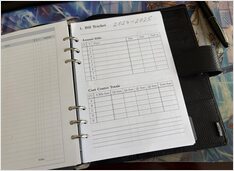
If you could not find suitable blank refills for your planner, you can DIY them using MS Word or LaTeX. See here how to create a Bill Tracker Filofax insert in A5 size with LaTeX. This guide is part of our Documentation Tools in 2026: Markdown, LaTeX, PDF & Printing Workflows hub.