Browser Automation in Python: Playwright, Selenium & More
Python browser automation and E2E testing compared.
Choosing the right browser automation stack in Python affects speed, stability, and maintenance. This overview compares Playwright vs Selenium vs Puppeteer vs LambdaTest vs ZenRows vs Gauge - with a focus on Python, while noting where Node.js or other languages fit in.
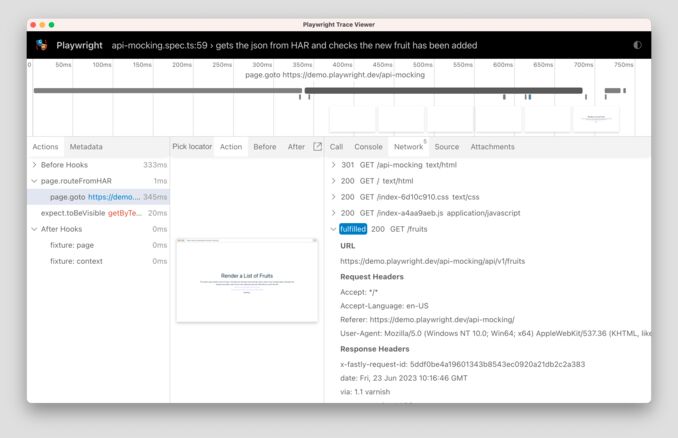 Here we have a screenshot of Playwright trace viewer
When to use which
Playwright (Python)
Playwright is an open-source browser automation library from Microsoft. It speaks to Chromium, Firefox, and WebKit over the Chrome DevTools Protocol (CDP) or WebSocket, so you get one API across all three engines. It ships with auto-waiting: before every action (click, fill, etc.) it waits for the element to be visible, stable, and actionable, which cuts down flakiness and the need for manual sleep or WebDriverWait. Setup is minimal (pip install playwright then playwright install), and the Python API is first-class (sync and async). Use it for new E2E test suites, scripting, or automation (e.g. building MCP servers in Python that drive a browser). For a complete walkthrough with Python, JavaScript, and TypeScript examples, see Playwright: Web Scraping & Testing. Pair it with unit testing in Python for the rest of your app and use Playwright only for the browser layer. Downsides: newer than Selenium, so fewer third-party integrations and less legacy material; no official support for very old browsers.
Selenium (Python)
Selenium is the long-standing standard for browser automation. The Selenium Project (open source, backed by the OpenJS Foundation) provides the WebDriver API: you send commands to a browser-specific driver (ChromeDriver, GeckoDriver, etc.), which talks to the real browser. Selenium supports many languages (Python, Java, C#, JavaScript, etc.) and the widest range of browsers, including legacy ones. Selenium 4+ includes Selenium Manager, so you no longer need to download or path driver binaries manually-the client fetches the right driver for you. The API does not auto-wait; you typically use WebDriverWait and expected conditions to avoid flaky tests. Use Selenium when you maintain existing WebDriver suites, need the broadest ecosystem and language support, or must support older browsers. It fits Python design patterns for clean architecture when you wrap the driver behind a small adapter. Downsides: generally slower and more brittle than Playwright without careful wait strategy; more boilerplate.
Puppeteer
Puppeteer is Google’s Node.js library for controlling headless Chrome/Chromium (and Chromium-based Edge). It uses the Chrome DevTools Protocol directly and is the de facto choice for JavaScript/TypeScript teams doing Chrome-only automation, PDF generation, or scraping in Node. There is no official Python binding; the API is Node-only. If your stack is Python, use Playwright (same “CDP control” idea with first-class Python) or Selenium. If you are in Node.js and only need Chromium, Puppeteer is a strong, well-documented option. Downsides: Chrome/Chromium only; no Firefox or WebKit; no Python.
LambdaTest
LambdaTest is a commercial cloud testing platform. You keep writing the same Selenium or Playwright (or Cypress, etc.) scripts locally, but instead of launching a local browser you connect to LambdaTest’s grid. They provide real browsers and real devices (including mobile) in the cloud, so you can run tests in parallel across many OS/browser/version combinations without maintaining your own lab. You get a dashboard for results, videos, and logs. Use it when you need cross-browser coverage, parallel execution at scale, or mobile emulation and don’t want to host the infrastructure. It also supports Gauge: you run your Gauge specs on their Selenium grid. Downsides: paid (with free tiers); tests run over the network so latency and availability depend on their service.
ZenRows
ZenRows is a commercial web scraping and anti-detection service. Its Scraping Browser is a cloud browser you control via Playwright (or other CDP-compatible tools): you connect your script to a WebSocket endpoint and the browser runs on ZenRows’ side with residential proxies, IP rotation, anti-bot bypass (e.g. Cloudflare, DataDome), and optional CAPTCHA handling. You don’t change your Playwright logic-only the browser endpoint. Use it when your goal is scraping and you hit blocks or rate limits; for plain E2E testing on your own app, local Playwright or Selenium is usually enough. Downsides: paid; aimed at scraping, not general-purpose test grids like LambdaTest.
Gauge
Gauge is an open-source test framework from Thoughtworks. It focuses on specifications and reporting: you write specs in Markdown (or other formats) with scenarios and steps, and implement the steps in Python (or Java, JavaScript, etc.) using Selenium-or any other driver-to drive the browser. Gauge does not replace Selenium or Playwright; it sits on top of them and adds structure, reuse, and readable reports. Use it when you want BDD-style specs, living documentation, and clear test reports on top of your existing Selenium (or similar) setup. LambdaTest supports running Gauge tests on their grid. Downsides: extra layer to learn and maintain; you still need to choose and configure a browser automation driver (e.g. Selenium).
Where they run
- Playwright: Local or CI; Python 3.8+; Windows, macOS, Linux. Also works with cloud/remote browsers (e.g. ZenRows, LambdaTest) by connecting to a WebSocket or CDP endpoint.
- Selenium: Local or CI; any language with a WebDriver client; Selenium Grid or a provider like LambdaTest for scale.
- Puppeteer: Node.js only; typically Chrome/Chromium on the machine or in Docker.
- LambdaTest: Cloud only; you run Selenium/Playwright (or Gauge over Selenium) against their grid.
- ZenRows: Cloud Scraping Browser; you drive it from Python (e.g. Playwright) or other CDP-compatible tools.
- Gauge: Runs on your machine or CI; uses Selenium (or another driver) under the hood; can target LambdaTest’s grid.
For a quick reference of Python ecosystem trends, see top trending Python projects on GitHub; many automation and testing tools show up there.
How to use them in Python
Playwright (Python)
Playwright’s Python package provides both sync and async APIs. Browsers are installed separately so the library stays small and you can pick only the engines you need (Chromium, Firefox, WebKit). Install and install browsers:
pip install playwright
playwright install
Sync example (navigate, click, read text-Playwright auto-waits for elements):
from playwright.sync_api import sync_playwright

with sync_playwright() as p:
    browser = p.chromium.launch(headless=True)
    page = browser.new_page()
    page.goto("https://example.com")
    print(page.title())
    # Click link, then check heading (auto-waits built in)
    page.get_by_role("link", name="More information...").click()
    heading = page.get_by_role("heading", name="Example Domain").text_content()
    print(heading)
    browser.close()
Async is recommended for concurrency and fits LLM-structured output workflows or scripts that do I/O while the browser runs:
from playwright.async_api import async_playwright
import asyncio

async def main():
    async with async_playwright() as p:
        browser = await p.chromium.launch(headless=True)
        page = await browser.new_page()
        await page.goto("https://example.com")
        print(await page.title())
        await browser.close()

asyncio.run(main())
For a Python cheatsheet and syntax reference, keep a local doc handy.
Selenium (Python)
The Python client uses the W3C WebDriver protocol. Selenium 4+ uses Selenium Manager to download and manage the correct driver (ChromeDriver, GeckoDriver, etc.) automatically, so you no longer need to download drivers manually:
pip install selenium
Basic example with explicit wait (Selenium does not auto-wait; use WebDriverWait or expected conditions):
from selenium import webdriver
from selenium.webdriver.common.by import By
from selenium.webdriver.support.ui import WebDriverWait
from selenium.webdriver.support import expected_conditions as EC

driver = webdriver.Chrome()
driver.get("https://example.com")
# Wait for body to be present, then get title
WebDriverWait(driver, 10).until(EC.presence_of_element_located((By.TAG_NAME, "body")))
print(driver.title)
driver.quit()
Click and read text:
from selenium import webdriver
from selenium.webdriver.common.by import By
from selenium.webdriver.support.ui import WebDriverWait
from selenium.webdriver.support import expected_conditions as EC

driver = webdriver.Chrome()
driver.get("https://example.com")
link = WebDriverWait(driver, 10).until(
    EC.element_to_be_clickable((By.LINK_TEXT, "More information..."))
)
link.click()
heading = WebDriverWait(driver, 10).until(
    EC.visibility_of_element_located((By.CSS_SELECTOR, "h1"))
)
print(heading.text)
driver.quit()
Puppeteer (Node.js; no official Python)
Puppeteer is JavaScript/Node.js only-Google maintains no Python API. If you need a Puppeteer-like experience in Python, use Playwright (same “control Chrome over CDP” idea, with first-class Python and auto-waits). There is an unofficial port pyppeteer, but it is not actively maintained; for new Python work, Playwright is the better choice. Below is the Node.js example so you can compare the API:
npm init -y && npm install puppeteer
const puppeteer = require("puppeteer");

(async () => {
  const browser = await puppeteer.launch({ headless: true });
  const page = await browser.newPage();
  await page.goto("https://example.com");
  console.log(await page.title());
  await page.click("a[href='https://www.iana.org/domains/example']");
  const text = await page.$eval("h1", (el) => el.textContent);
  console.log(text);
  await browser.close();
})();
LambdaTest (Python: Selenium)
You use the same Selenium API; the only change is connecting to LambdaTest’s remote WebDriver hub instead of a local driver. Set capabilities (browser, OS, build name, etc.) and pass your username and access key from the LambdaTest dashboard:
from selenium import webdriver

options = webdriver.ChromeOptions()
options.browser_version = "latest"
options.platform_name = "Windows 11"

lt_caps = {
    "lt:options": {
        "username": "YOUR_LT_USERNAME",
        "accessKey": "YOUR_LT_ACCESS_KEY",
        "build": "Playwright-Selenium-Compare",
        "name": "Selenium on LambdaTest",
    }
}
options.set_capability("lt:options", lt_caps["lt:options"])

driver = webdriver.Remote(
    command_executor="https://YOUR_LT_USERNAME:YOUR_LT_ACCESS_KEY@hub.lambdatest.com/wd/hub",
    options=options,
)
driver.get("https://example.com")
print(driver.title)
driver.quit()
LambdaTest (Python: Playwright)
Playwright can attach to a remote browser via the CDP (Chrome DevTools Protocol). LambdaTest exposes a CDP endpoint for each test run; you connect to it instead of launching a local browser. See LambdaTest’s docs for the exact CDP URL format and authentication:
from playwright.sync_api import sync_playwright

# LambdaTest supplies a CDP endpoint per run; use their docs to obtain it
CDP_URL = "wss://cdp.lambdatest.com/playwright?capabilities=..."  # from LT dashboard

with sync_playwright() as p:
    browser = p.chromium.connect_over_cdp(CDP_URL)
    page = browser.new_page()
    page.goto("https://example.com")
    print(page.title())
    browser.close()
ZenRows + Playwright (Python)
ZenRows’ Scraping Browser is CDP-compatible, so you use Playwright’s connect_over_cdp() with their WebSocket URL. The browser runs in ZenRows’ cloud with their proxies and anti-bot handling; your script stays the same apart from how you connect. Only the launch step changes:
from playwright.sync_api import sync_playwright

ZENROWS_WS = "wss://browser.zenrows.com?apikey=YOUR_ZENROWS_API_KEY"

with sync_playwright() as p:
    browser = p.chromium.connect_over_cdp(ZENROWS_WS)
    page = browser.new_page()
    page.goto("https://example.com")
    html = page.content()
    print(html[:500])
    browser.close()
Then pass the resulting HTML into your own parser or, for example, converting HTML to Markdown with Python for downstream processing.
Gauge + Selenium (Python)
Gauge keeps specs in Markdown (or other formats) and step implementations in Python. Each step can call Selenium (or any other driver) to open the browser, navigate, and assert. Example layout:
Spec specs/example.spec:
# Example spec

## Open site and check title

* Open browser and go to "https://example.com"
* Page title should be "Example Domain"
Steps step_impl/example.py:
from getgauge.python import step, before_scenario
from selenium import webdriver

driver = None

@before_scenario()
def init_driver():
    global driver
    driver = webdriver.Chrome()

@step("Open browser and go to <url>")
def open_url(url):
    driver.get(url)

@step("Page title should be <title>")
def check_title(title):
    assert driver.title == title, f"Expected {title}, got {driver.title}"
Install Gauge, the Python runner, and the Selenium plugin; run with gauge run specs/. To run on LambdaTest, set the Selenium driver to use LambdaTest’s remote URL and capabilities in a before_scenario hook instead of webdriver.Chrome().
Summary
| Tool | Python | Role | Best for |
|---|---|---|---|
| Playwright | Yes | Browser automation | New E2E tests, scraping, multi-browser, speed |
| Selenium | Yes | Browser automation | Legacy tests, broad ecosystem, many browsers |
| Puppeteer | No | Browser automation | Node.js/Chrome-only projects |
| LambdaTest | N/A | Cloud grid | Parallel, cross-browser, Gauge + Selenium |
| ZenRows | Via PW | Scraping browser | Anti-bot, proxies, CAPTCHA; use with Playwright |
| Gauge | Yes | Test framework | BDD specs + Selenium (or other driver) |
For new Python work, Playwright is the default choice; add LambdaTest or ZenRows when you need cloud scale or scraping resilience. Keep Selenium for existing suites and Gauge when you want spec-first test design on top of Selenium.
Useful links
- Playwright: Web Scraping & Testing
- Top 17 Trending Python Projects on GitHub
- Unit Testing in Python
- Python Design Patterns for Clean Architecture
- Python Cheatsheet
- LLMs Structured Output: Ollama, Qwen3 & Python or Go
- Converting HTML to Markdown with Python: A Comprehensive Guide
- Building MCP Servers in Python: WebSearch & Scrape
References
- Playwright Python – Installation and intro
- Selenium 4.31 release (2025)
- Puppeteer vs Playwright vs Selenium (2026)
- Selenium vs Playwright vs Puppeteer benchmark
- Playwright vs Selenium – BrowserStack
- ZenRows – Integrate Playwright with ZenRows
- ZenRows Scraping Browser – Getting started with Playwright
- LambdaTest – Selenium with Gauge
